🌟Starlight - Make Your Documentation Shine
New task: host the docs. A tour of modern documentation solutions and why Starlight, the Astro template, emerged as the best choice.

New task: hosting the docs
In my latest wanderings, I had to deploy a new documentation site. And for once, I decided to dig into the subject a bit before reaching for the usual suspects.
Documentation sites are often relegated to the background, getting less attention than the big projects. Even though their UXs often look alike, they are everywhere on the internet, essential to a project’s life cycle, and come with a very wide range of solutions.
So I wanted to take advantage of the work on Blackswift to step back a little, instead of simply picking whichever one nailed its SEO best. My main motivations were to get something modern, easy to work with, fast and of course… We all love spending 2 days searching for the best solution to a problem that would take a mere 2 hours to solve.

Dinosaurs and Javascript
If you start digging into the subject, it won’t take long to realize there are 2 broad families of solutions for hosting your docs:
The full-Javascript projects 👨💻
Built with the latest trendy frameworks, compatible with everything-you-can-think-of, installable as PWAs (Progressive Web Apps) and much more… But merely visiting their home page is enough to trigger the “Mobile data usage” alert on your phone.
The other projects 🗿
They run on a single script, with files formatted in some obscure DSL (Domain Specific Language, like HTML or MediaWiki markup), and a project version number written in Roman numerals… But they are extremely frugal with resources and run on anything and everything.
This divide is surprising… but understandable!
After all, either you want a sober, purely utilitarian tool, in which case a single script is enough to compile your Markdown or LaTeX files and serve them on the web in the fastest, lightest way possible.
Or you want to offer a more sophisticated, dynamic tool. And then… you’ll probably need frontend reactivity with a framework like React or Vue, and possibly an active backend to go fetch data from all over the place. With that, you’ll be able to ✨dazzle✨ your visitors!
But what about the middle-ground solutions, halfway between these two philosophies? Those are often precisely the least popular ones. But I decided to dig. The time had come…. to investigate!

Good framework, bad framework
Let’s just say there are a lot of different solutions out there. Far too many for one article to list them all, or even for a series of articles to describe them without you tuning out along the way.
So I had to narrow things down, and I decided to filter based on these main criteria:
Lightweight 🚀
No heavy infrastructure to run it, no gigantic javascript bundles.
Extensible 🧩
And if tomorrow I need to add a React component, and the day after that I want no JS at all, I want it to be simple to do.
Not too niche 🤓
So it’s easy to find information and the technologies to use (Sorry odoc, that’s too much for me).
Modern to maintain 🛠
No hacks to get it running and build it. No updates that are too frequent or too major.
Frontend UX ✨
It has to reflect the previous points and offer a smooth, pleasant experience for visitors. I’m not doing this just for myself!
You’ve already read the article’s title… so let’s not pretend to objectively compare the solutions against these (already biased) criteria only to land on the one I picked! But it’s always enriching to survey the competition before getting to the heart of the matter.
With these criteria and after some research, I finally arrived at a shortlist of viable solutions.
To avoid adding third-party services and extra billing, I only considered self-hosted open source projects. Which de facto excluded solutions like online wikis or Gitbook. In short, if the solution’s website has a “Pricing” tab in the menu… it generally wasn’t even considered!

The Famous Five
Docusaurus
Docusaurus is arguably the trendiest project on this list, making it fairly simple to deploy documentation.
It is deeply integrated into and popular within the Javascript ecosystem, runs on React, and lets you write your documentation in Markdown or embed React content.

Vitepress
Vitepress is the equivalent of Docusaurus but based on the Vue Javascript framework.
Less popular (but gaining momentum), it takes its name from Vite, a tool from the Javascript ecosystem designed to improve local performance and optimize production bundles. Vitepress is an SSG (Static Site Generation) solution that lets you write your documentation in Markdown. During the build step, it compiles everything into static files.

Docsify
Docsify is another Javascript-based project, with the peculiarity of having no build step at all!
On a Docsify site, as you browse the documentation in your browser, instead of fetching pre-rendered files, you load Markdown files directly and the HTML rendering happens browser-side.

Mkdocs
Mkdocs is a fairly widespread Python project that lets you create your documentation quite simply.
Like most competing solutions, once written, the documentation is compiled into static files that are easy to serve, and it uses jQuery and Bootstrap on the frontend to enrich the experience.

Starlight
Starlight is not strictly speaking a documentation solution but a project template for Astro.
Although the end result is close to a Docusaurus, it stands out mainly through its determination to avoid browser-side Javascript as much as possible — and when needed, it allows itself to be framework-agnostic (if you still want some.)
The chosen one
After this first round of pruning, and based on the criteria mentioned above, my choice finally landed on 🌟 Starlight 🌟. But why?
As briefly mentioned above, it ticks all my boxes and offers, in my view, the most compelling proposition:
Lightweight?
In production, all we’ll have is nginx and a minimum of JS in the browser.
Extensible?
You can do dynamic rendering with React, Vue, Svelte, and more (the list keeps growing), extend the theme, add modules or develop your own.
Not too niche?
Docs are written in Markdown and it’s fully integrated into the Javascript ecosystem. Its evolution is tied to Astro’s, a very dynamic project (even if it’s all about building static sites!)
Modern to maintain?
A standard Node/Javascript stack and easy containerization.
Frontend UX?
Little frontend JS and static files served by nginx. We’re not far from the maximum, even in MPA (Multi-Page Application) mode.
Okay, that’s all very nice! But what exactly is Starlight in the end… since it’s just an Astro project template? And for that matter, what is Astro?
Perfectly legitimate questions, and I’m delighted you’re following along!
Astro-what?
Astro is a web framework whose primary goal is to serve static content.
If you run an online ticket-booking site, this is not the solution for you. But a personal blog or documentation to host? You’ve found your champion!
Its operating principle is exactly that: it lets you write your content pages in Markdown or HTML, or fetch them from remote sources, and include components from just about any JS framework. It then has a compilation step to optimize it all.
The idea is to pre-render the majority of your pages (in SSG or SSG+SSR). To keep those pages dynamic, the interactive zones act like islets — the only spots of activity in the middle of a calm, motionless ocean. And that’s precisely the name Astro picked: Islands.
So what about Starlight? It’s just a template that simplifies project initialization, layout and content writing in Astro. You create the project, and all that’s left is to start writing your documentation, then build it and ship it to production!
Stellar possibilities
Good! With introductions out of the way, we can dig a little deeper below the surface and see what its main strengths are, just to make sure I won’t regret my choice later.
Installation
Very well documented, like most modern JS solutions. You lift off with a single command (here with pnpm, just to be original):
pnpm create astro --template starlightThen a quick pnpm run dev and a visit to http://localhost:4321 . You’re up and running!
Writing content
If, like me, you don’t need anything more: you’ll write nothing but Markdown topped with a bit of frontmatter for the metadata (position in the menu, SEO, …) at the beginning of the file.
For example:
---
title: Déployez un Wordpress avec Helm
description: Comment déployer un chart Helm wordpress
sidebar:
order: 30
---
SSR and SSG
By default, Starlight compiles your Markdown files during the build. But if needed, SSR (Server Side Rendering) remains possible and some data can be fetched dynamically.
Search
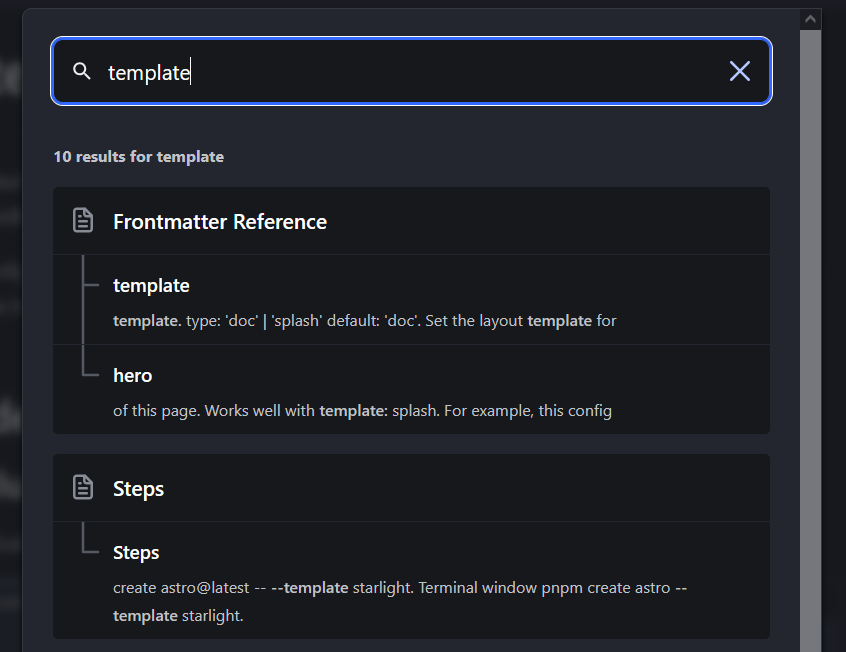
Search is probably the most magical part: Starlight is compiled, only needs nginx to run, yet still offers smart content search, without having to load everything into the browser.
How does it pull that off? Well, with **Pagefind **!
Fully integrated, during the project build it simply analyzes your Markdown files and builds indexes that it stores in static files. These files are then requested by the frontend as needed during a search.
The result is an extremely fast search, relying solely on static files!
Translations (i18n)
Internationalization is of course supported, with the ability to define a default fallback. The language selector is there out of the box, and all you need to do is split your docs sources into one folder per locale.
Components
It’s Astro, so you can create custom components! These can be Astro, React, Svelte, Vue components, etc.
All of this ultimately stays compiled “as simply as possible” in the browser, which guarantees good flexibility on that front, without the drawbacks.
And of course, there are the components provided out of the box for cards, asides, icons, badges, etc.
Environmental impact
Now of course, the benchmarks proudly displayed by Starlight are biased and based on an online tool that computes a carbon index. The benchmark merely loads the first page of the sites in question: a few images are enough to make the score explode.
Nevertheless, given Starlight’s optimizations and way of doing things, we are fully aligned with their overall philosophy, which bets on frugality and sustainability.
What about DevOps in all this?
Sorry, I hadn’t forgotten… I was just waiting for the right moment to bring it up!
With all its server-side advantages, you can already guess it, but it’s a treat to serve and manage for a DevOps engineer.
Containerization
You don’t have Node installed locally? You don’t have a… local machine?
Well! As long as you have a keyboard and some kind of access to Docker… developing on Starlight requires little more than a Docker image as simple as this one:
FROM node:20.10-alpine
ENV HOST=0.0.0.0
ENV PORT=4321
EXPOSE 4321
RUN corepack enable # Installs pnpm
COPY ./ /app
WORKDIR /app
CMD ["pnpm", "dev", "--host"]
Preparing the deployment: the build
That’s all very well… but how do we deploy? We keep talking about having everything static… but for now, all we have is a Docker image with Node — the name does look a bit like nginx (it does, if you squint!) but that’s about it.
How do we go from “that” to our beloved static files? Well, we build the project.
I won’t get into the specifics of the CI. But it’s fairly simple: if you want everything static, all you have to do is run, in a Node environment:
corepack enable # Enables pnpm in a node container
pnpm install --frozen-lockfile
pnpm build
Preparing the deployment: the server
Good! The project is built, the generated files are in the dist folder, and all that’s left is to build an nginx image containing your sources with the following Dockerfile (brace yourselves!):
FROM nginx:1.19-alpine
COPY ./dist/ /usr/share/nginx/html
Deploying
That’s it! Technically, your nginx image can now be deployed anywhere, and you’ll have access to your Starlight in production mode. You can test it very quickly with the following command:
docker build -t starlight-nginx . # Build the image
docker docker run --rm -f starlight-nginx # Run it
The fly in the ointment
So much for the grand tour! In practice, nothing is fundamentally different from some other frameworks, but its focus on frugality struck a particular chord with me and convinced me to give it a try. I haven’t been disappointed since! 🌟
However, it would be dishonest not to mention the two main “drawbacks” of this solution. Nothing deal-breaking, and this is a personal view, but worth keeping in mind nonetheless!
No client-side navigation
For frontend framework aficionados, this point may sound like heresy, but Starlight only has an MPA (Multi Page Application) mode and is not an SPA (Single Page Application).
Wondering what the implications are? Well, when you click a link in an MPA (and therefore in Starlight), the result differs from sites with a React frontend, for instance (a fetch of the data to update only the relevant parts of the page with what was retrieved). Instead, it behaves like a classic website, where every click triggers a full page reload to bring up the content you clicked on.
Astro itself supports client-side navigation via view transitions, so if it’s not already the case by the time this article is published, Starlight should follow — but keep in mind that the native experience is an MPA.
Not 1.0 yet
As I write these lines, Starlight is at version 0.28.3. As with any pre-1.0 release, be careful about what you do with it and keep that information in mind. Things could still change drastically (for better or worse.)
To mitigate that risk, a few points are worth noting:
- Since your production version is just HTML files, you’ll never have to worry about your sites already in production suddenly breaking, or not being redeployable elsewhere
- Migrating to other solutions will be easier since your content is written in Markdown
- Astro, Starlight’s “engine”, is currently at 4.X. Stable, with very active development, and the team seems to listen to its community.
To infinity and beyond
We’re reaching the end of this article… but for our documentation, it’s only the beginning! You’ve probably guessed it from the title, but as far as I’m concerned, Starlight won me over, and we’ll keep putting it to work at Blackswift for a good while!
If you want to take a look at the version I put online with this solution, you can check it out over here.
In any case, this article is not meant to be an exhaustive study. Feel free to do your own research and write your own article if you think another solution also deserves your praise!
At the end of the day, they’re all worth it, and you’re better off simply using whatever you’re comfortable with and believe you can make the most of. While keeping that spark of curiosity alive to explore new paths and discover ever more interesting solutions.
On that note, happy liftoff with Starlight and have fun!